
Automate Banner Image Generation at Scale
Create reusable banner templates and generate ad creatives, promotional graphics, and campaign variants automatically using API, Zapier, Make, n8n, or direct URL parameters.
Say goodbye to manual design and embrace automation today!
- Automatically Generate images, social media images or QR Codes.
- Render every banner size from one reusable template — 728 × 90, 300 × 250, 300 × 600 and the rest.
- Integration with Zapier, Make.com, N8n, or REST API.
- Trusted to generate millions of PDFs and images
Get started for FREE, upgrade as you grow
Trusted by Companies, Developers and Builders
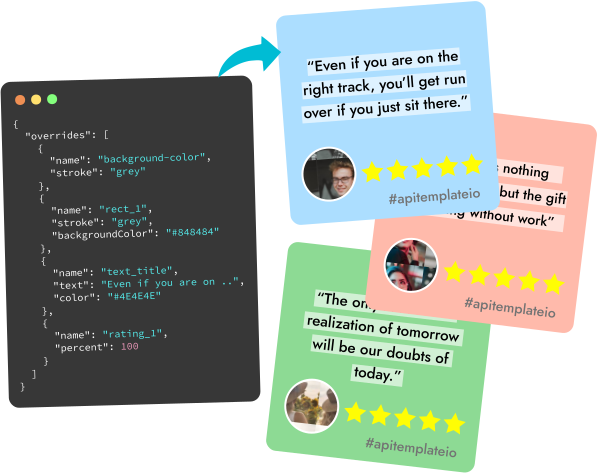
Built for Automated Image Generation
Design banner templates visually, drive them with dynamic data, and generate finished creatives through the API or your no-code stack.
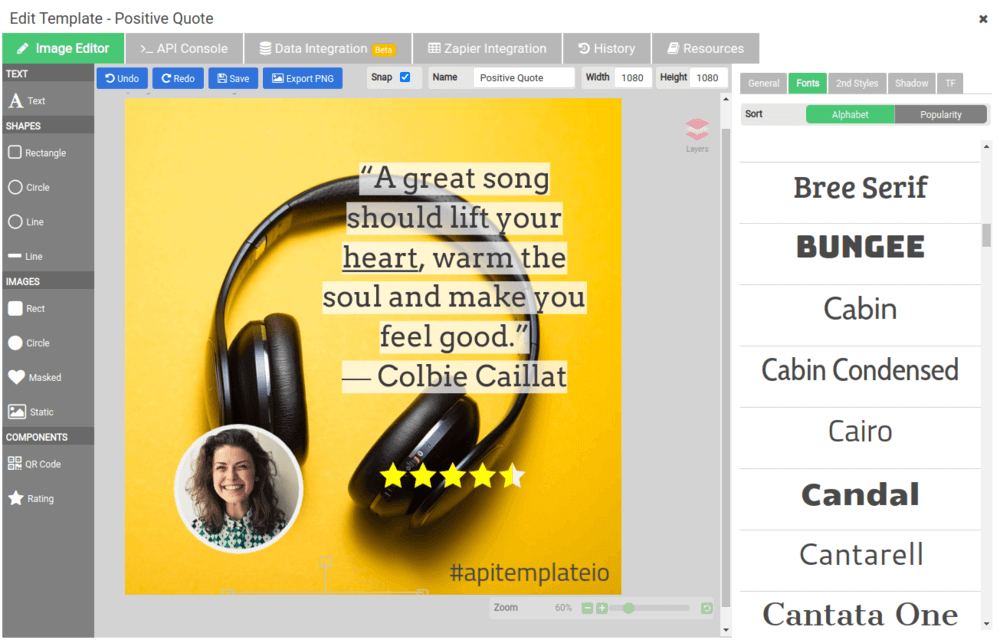
Drag-and-Drop Editor
Use a drag-and-drop image editor with no HTML or CSS knowledge required.
No-Code Integrations
Integrate with Zapier, Integromat, n8n, Airtable, UiPath, and other no-code platforms.
Powerful Image API
Modify text and visual element properties dynamically through the API.
Social Media Templates
Use templates for Facebook posts, Instagram posts, and other social media graphics.
Dynamic Components
Support QR codes, barcodes, ratings, charts, and other dynamic visual components.
Instant Preview & JSON
Preview output and customize JSON data instantly with the API console.
Built-In Effects
Apply blur, noise, pixelate, brightness, and other built-in photo effects.
JPEG, PNG & Transparent PNG
Produce JPEG and PNG outputs, including support for transparent PNG.
Scale Content Production Without Losing Brand Consistency
Our image generation API allows you to generate banners in bulk from a reusable image template to create ad creatives, promotional graphics, and campaign variants, and use them across your ad networks, landing pages, or marketing campaigns.
You can now stay consistent by automating the creative production and rendering every banner size from the same source. It saves time, protects your brand, and lets you test more variants by producing them faster.
Banner Generation
Built for common display banner formats
Create multiple banner sizes from the same template and content source.
728 × 90
LeaderboardThe standard desktop header unit, running above the fold across the full width of a page. Accepted almost everywhere on the Google Display Network and programmatic inventory.
300 × 600
Half PageA tall sidebar unit with high viewability and room for a product shot, headline, and call to action — a consistent performer for retargeting campaigns.
300 × 250
Medium RectangleThe most widely supported display ad size, placed both in-content and in sidebars on desktop and mobile. Start here if you only produce one banner.
336 × 280
Large RectangleA wider in-content rectangle that gives a headline and product image more room than the 300 × 250, on the same placements.
970 × 250
BillboardA premium above-the-fold desktop unit for brand campaigns, with enough canvas for full-bleed photography and a large headline.
160 × 600
Wide SkyscraperA vertical sidebar unit that stays in view as the reader scrolls, which suits stacked messaging and long-form content sites.
320 × 50
Mobile LeaderboardThe mobile banner, usually anchored to the top or bottom of the viewport. Keep it to one line of copy and a small logo.
468 × 60
BannerThe original full banner, still used on legacy inventory and lightweight placements where a leaderboard will not fit.
Banner Generation with Zapier or Make.com or REST API
Automate PDFs and images from Zapier, Make.com or n8n — or call the REST API from Python, C#, Java, PHP and UiPath.
curl -X POST \
  "https://rest.apitemplate.io/v2/create-pdf?template_id=6b277b234d395eca" \
  --header "Content-Type: application/json" \
  --header "X-API-KEY: YOUR_API_KEY" \
  --data '{"invoice_no": "INV38379", "total_amount": 82542.56}'

# {"status": "success", "download_url": "https://pdf.apitemplate.io/..."}
const url =
"https://rest.apitemplate.io/v2/create-pdf?template_id=6b277b234d395eca";
const res = await fetch(url, {
method: "POST",
headers: {
"Content-Type": "application/json",
"X-API-KEY": "YOUR_API_KEY",
},
body: JSON.stringify({ invoice_no: "INV38379", total_amount: 82542.56 }),
});
const { download_url } = await res.json();import requests
res = requests.post(
"https://rest.apitemplate.io/v2/create-pdf",
params={"template_id": "6b277b234d395eca"},
headers={"X-API-KEY": "YOUR_API_KEY"},
json={"invoice_no": "INV38379", "total_amount": 82542.56},
)
download_url = res.json()["download_url"]var url = "https://rest.apitemplate.io/v2/create-pdf"
+ "?template_id=6b277b234d395eca";
var json = "{\"invoice_no\": \"INV38379\", \"total_amount\": 82542.56}";
var request = HttpRequest.newBuilder().uri(URI.create(url))
.header("Content-Type", "application/json")
.header("X-API-KEY", "YOUR_API_KEY")
.POST(HttpRequest.BodyPublishers.ofString(json))
.build();
var res = HttpClient.newHttpClient()
.send(request, HttpResponse.BodyHandlers.ofString());Automate PDF and image generation with no-code platforms or the REST API
One reusable template, one JSON payload. Send data from a Zapier zap, a Make.com scenario, an n8n workflow or your own backend — every integration calls the same endpoint and returns a ready-to-share file URL.
Generate synchronously for on-screen downloads or asynchronously with webhooks for batches, and keep processing and storage in your chosen region: US, EU, Singapore or Australia.
Browse all integrationsNative integrations for the tools your team already runs, plus a REST API for everything else.













How image generation works
Generate dynamic images in 4 simple steps
Build reusable image templates, pass dynamic data, trigger generation through API or automation, and deliver PNG or JPEG output anywhere in your workflow.
Create a template
Build a reusable image template with drag-and-drop tools.
Send dynamic data
Override text, image URLs, colors, effects, and layout using JSON.
Trigger generation
Trigger image generation from your app, backend, Zapier, Make, n8n, Airtable, or UiPath.
Deliver the output
Use the generated PNG or JPEG URL in your product, campaign, workflow, or publishing system.
Customer Reviews
Trusted by businesses worldwide to generate millions of PDFs and images reliably.
See what our customers have to say
 Jamie DearFounder
We are very grateful to Jacky and the team at APITemplate - their software has helped us to auto-generate high quality images for our student reports. It has been the perfect fit for us as we grow our Oxford summer school.
 Alex DowdingVice Secretary
The Wheelchair Football Association
We've successfully automated YouTube thumbnails and match event creation for our Powerchair Football league using your templates. It integrates with our Postgres database on retool.com, is expanding to include league table graphics and match results. Thanks to an AWS Inclusion and Diversity grant, we're enhancing our live-streaming workflow, further boosted by your product's automation capabilities. We're grateful for your excellent service and wanted to share our positive experience.
 Nishitha DhanekulaCofounder /CTO
At askreferral.io, We are building referral networking platform for people to pitch and generate leads for different kinds of referrals, including, but not limited to job referrals, product referrals, funding referrals, realtor referrals etc. Having a vibrant social media community is crucial for our growth and APITemplate.io played crucial role in automating generation of digital posters for job postings, profile pitches, funding requests etc, to help us grow from 0 to 200K+ followers in LinkedIn in less than one year.
 Danaé NicolasCTO
We've been using APITemplate.io to generate social images for our karting races and it's been a huge time-saver. The support team is super responsive and helpful - they quickly resolved an issue we encountered. We highly recommend this tool to anyone who needs a similar solution.
 Ryan TurnbullIT Manager
APITemplate.io is such an easy application to use. Simple, intuititive, and code free. At simplehuman, we render all our commercial invoices, dispatch notes, and multiple other templates. The ability to create multiple layouts, and group them into a logical container - makes our lives much simpler. This is a great tool to use, both affordable, and the support service turnaround time is second to none! Defintely worth the subscription!
 Ron P.Product Manager
Had an issue with template implementation via Make and reached out for support. Within minutes, I got a response and was soon on a Zoom call resolving it. Despite the issue not being directly related to APITemplate.io, their team efficiently guided me to the right formatting. Many thanks!
 Nicholas GertzProduct Owner
We have been using the service daily in our application for a year and are very satisfied with the reliability. It meets all our requirements and requests for changes/improvements can be discussed directly with Jacky 1:1. Thanks and greetings from Germany
 Lucas FridmanChief Product Officer
We use APITemplate to generate key documentation we need to work with our industry partners. We are building a digital solution in an antiquated industry, which means we need to communicate data to our partners in the format that they are accustomed to (pdf forms). APITempate makes it easy for us to do this!
 Jean-Paul HornPublisher
We love APITemplate.io for its simplicity and ease of use. Just setup once and "forget" about it due to its fabulous 3rd party integration. New features are regularly added, and reasonable custom requests are honoured within days.
 Kevin Frickē
APITemplate.io is one of the best services I have worked with in a very, very long time. They are super responsive and a joy to work with. If you are struggling with PDF's, like I was, check 'em out!
 Jacob MonashAutomation Specialist
We run conferences with a number of speakers, each requiring an individual speaker profile. We used to create all of these profiles manually, but by incorporating APItemplate into our Zapier workflow, our team can generate a complete image with all of the speakers information in one click. Using the template editor is a bit of a learning curve, but the support team is very responsive and helpful.
 George Cooper
APITemplate.io is great. I love being able to quickly use HTML and CSS templates with dynamic variables to create documents. Support is also fast and responsive. Great vendor!
Sign up now for free!
Start generating PDFs and images from reusable templates today. No credit card, no commitment.