Comparison
Best PDF.co Alternative for Automated PDF Generation
PDF.co is a broad PDF toolkit covering extraction, editing, conversion, merging, and splitting. APITemplate.io is a better fit if your main need is generating professional documents and images at scale through reusable templates, HTML, or live URLs — with no-code automation through Zapier, Make, and n8n.

PDF + image generation workflows

Broad PDF operations toolkit (extract, edit, convert, create)
Quick Verdict
Choose APITemplate if…
Your team is focused on generating invoices, reports, certificates, labels, and branded assets through repeatable workflows. APITemplate gives you reusable templates, HTML‑to‑PDF, URL‑to‑PDF, image generation, and no‑code automation — all from a single, generation‑focused platform.
Choose PDF.co if…
You need a broad PDF operations toolkit that also handles extraction, editing, conversion, merging, splitting, OCR, barcode processing, and AI‑powered invoice parsing — not just document generation.
Why Teams Choose APITemplate over PDF.co
PDF.co is broad by design. It offers APIs for extraction, editing, converting, merging, splitting, OCR, barcode reading, and many other PDF tasks. That makes it useful for teams with varied document‑processing needs across many pipelines.
APITemplate is the stronger alternative if your main job is generating documents, not handling every possible PDF operation. It gives you a clearer workflow for reusable templates, HTML‑to‑PDF, URL‑to‑PDF, image generation, and no‑code automation — without the complexity of a larger PDF toolbox.
If your priority is automated document generation rather than general PDF processing, APITemplate is usually the better fit.
APITemplate vs PDF.co — Feature Comparison
| Feature | APITemplate | PDF.co |
|---|---|---|
| Best for | Better: PDF + image generation workflows | Broad PDF operations toolkit (extract, edit, convert, create) |
| PDF generation methods | Better: Templates (Visual builder or HTML/CSS), HTML, URLs | HTML‑to‑PDF, URL‑to‑PDF, advanced HTML templates with JSON/CSV data |
| Visual template editor | Better: Yes Drag-and-drop editor | No No visual template builder |
| URL-to-PDF, Markdown-to-PDF | Better: Yes Core feature | Yes URL‑to‑PDF supported |
| Image generation | Better: Yes Core platform capability | Yes PDF‑to‑Image conversion (not template‑based image generation) |
| Dynamic data / JSON support | Yes Reusable templates with JSON preview & testing | Yes HTML templates with JSON or CSV input data |
| Breadth of PDF tooling | Focused on PDF & image generation | Better: Extraction, editing, conversion, merging, splitting, OCR, barcodes, AI invoice parsing |
| No-code integrations | Zapier, Make, n8n, Bubble, Airtable, Coda.io, REST API | Zapier, Make, n8n, 3,000+ via REST API |
| Regional API endpoints | Better: Yes 4 regions — US, EU, Singapore, Australia | No Not available |
| Bring Your Own Storage | Better: Yes AWS S3, Cloudflare R2, Azure Storage | No Not available |
| Custom CSS & JavaScript | Yes Full CSS/JS control in PDFs | Yes CSS/JS in HTML‑to‑PDF workflows |
| Advanced PDF controls | Yes Headers, footers, page numbers, quality options | Yes Merge, split, rotate, compress, password protect |
| AI‑powered features | No Not available | Better: Yes AI Invoice Parser (template‑free) |
| SDKs & libraries | Yes Python, C#, Java, PHP, JavaScript, UiPath | Yes JavaScript, C#, VB.NET, Java, PHP, Python, PowerShell |
| Security | Yes SOC 2 Type II audited, 2FA, Data Processing Agreement | Yes SOC 2 Type II audited |
| Free plan / trial | Better: Free plan — 50 docs/month, no time limit | 1‑month free trial (credit‑based) |
| Paid plans from | $24/mo (3,000 PDFs) | ~$19.99/mo (2,500 credits, credit‑based billing) |
Frequently Asked Questions
Why should I pick APITemplate over PDF.co?
APITemplate is the stronger choice when your main need is generating documents and images at scale — not managing every possible PDF operation. It offers reusable templates, a drag‑and‑drop editor, HTML‑to‑PDF, URL‑to‑PDF, and image generation in one focused platform, while PDF.co spreads across extraction, editing, conversion, and many other PDF tasks.
Is APITemplate better than PDF.co for PDF generation?
For document generation specifically, yes. APITemplate is purpose‑built for repeatable document workflows with reusable templates, HTML, and URLs. PDF.co can generate PDFs too, but its platform is designed around a much broader set of PDF operations — which adds complexity if generation is your only need.
Can APITemplate replace PDF.co for invoices and certificates?
Yes. APITemplate handles invoices, reports, certificates, labels, and branded documents generated at scale from templates, HTML, or live URLs — with no‑code automation through Zapier, Make, and n8n.
Does APITemplate support dynamic data and templates like PDF.co?
Yes. Both platforms support dynamic data in document generation. APITemplate uses reusable templates with JSON data and also supports HTML‑to‑PDF and URL‑to‑PDF workflows. PDF.co supports advanced HTML templates with JSON or CSV input data.
Does PDF.co have a free plan?
PDF.co offers a 1‑month free trial with credits, but does not have a permanent free tier. APITemplate offers a free plan with 50 documents per month with no time limit.
When should I choose PDF.co over APITemplate?
Choose PDF.co if you need a broad PDF operations toolkit — extraction, editing, conversion, merging, splitting, OCR, barcode processing, or AI‑powered invoice parsing. If your primary need is generating professional documents and images through automated workflows, APITemplate is typically the better fit.
Generate Professional PDF Documents in seconds
Automate invoices, reports, certificates, and operational documents with reusable templates, HTML-to-PDF support, and infrastructure built for production.
Powerful PDF Generation API
Powerful API and template engine for PDF documents.
Dynamic Reusable Templates
Build repeatable document workflows with reusable templates.
Visual Editor for WYSIWYG
Convert editor content to PDF without HTML knowledge.
Convert HTML to PDF
Convert HTML to PDF with production-ready rendering.
Custom CSS & JS
Support custom CSS and Javascript for advanced control.
No-Code and REST API Integrations
Works with Zapier, Make, n8n, Airtable, UiPath, and more.
Fast Preview & JSON
Fast HTML preview and custom JSON data for testing.
Support Headers & Footers
Support headers, footers, page numbers, and total pages.
One Platform, Three Ways to Generate PDFs
From visual template editing to seamless HTML-to-PDF conversion, create stunning, fully-customized PDFs tailored to your business needs—all without coding expertise. Perfect for invoices, reports, and more.
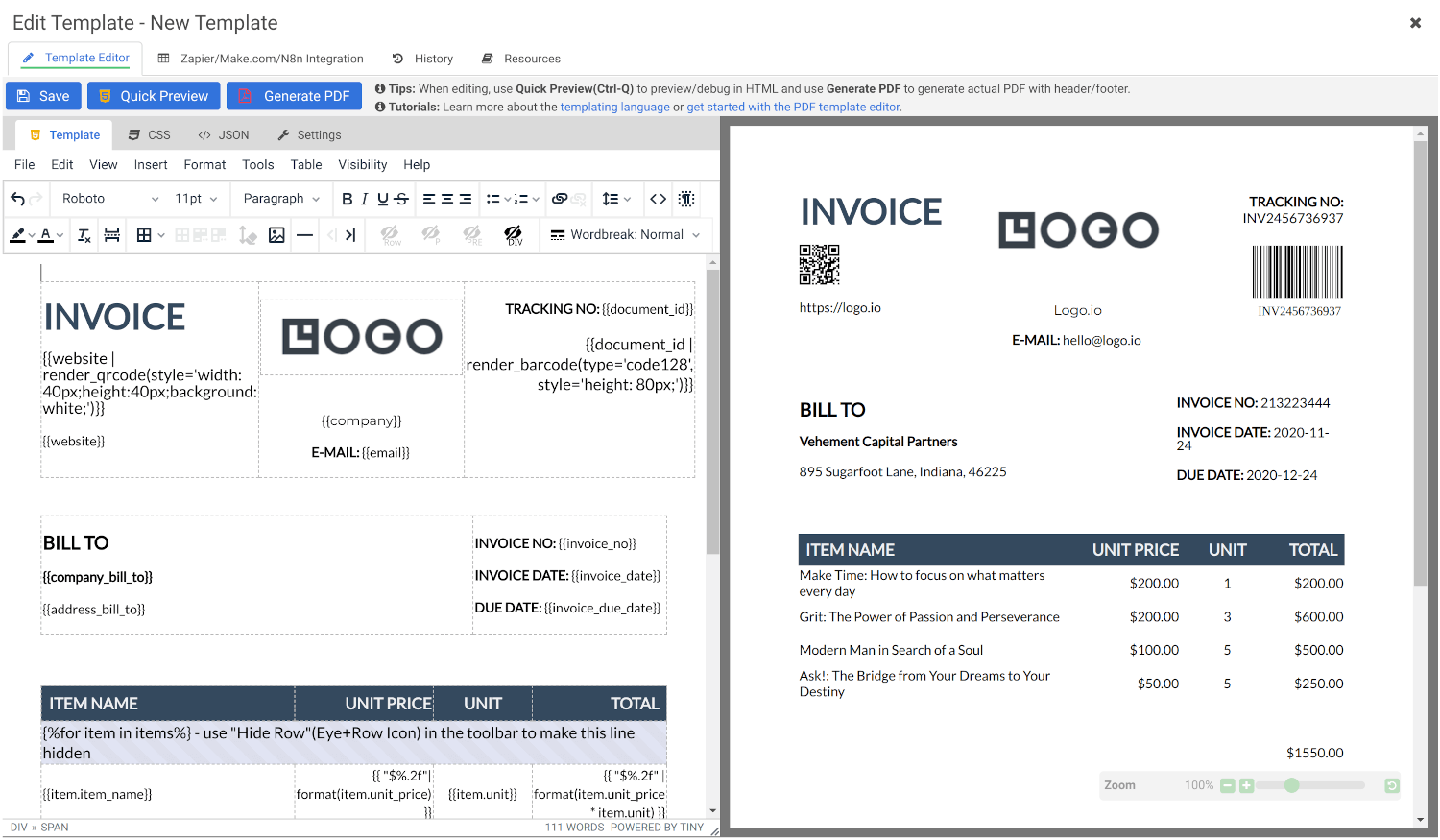
Create Document Templates with Visual Editor
Create stunning PDFs using our WYSIWYG Template Editor. With its user-friendly interface, you can design templates visually — no coding required.
Combine your designs with JSON data to generate dynamic, fully-customized PDFs tailored to your needs. Perfect for invoices, reports, certificates, and more.
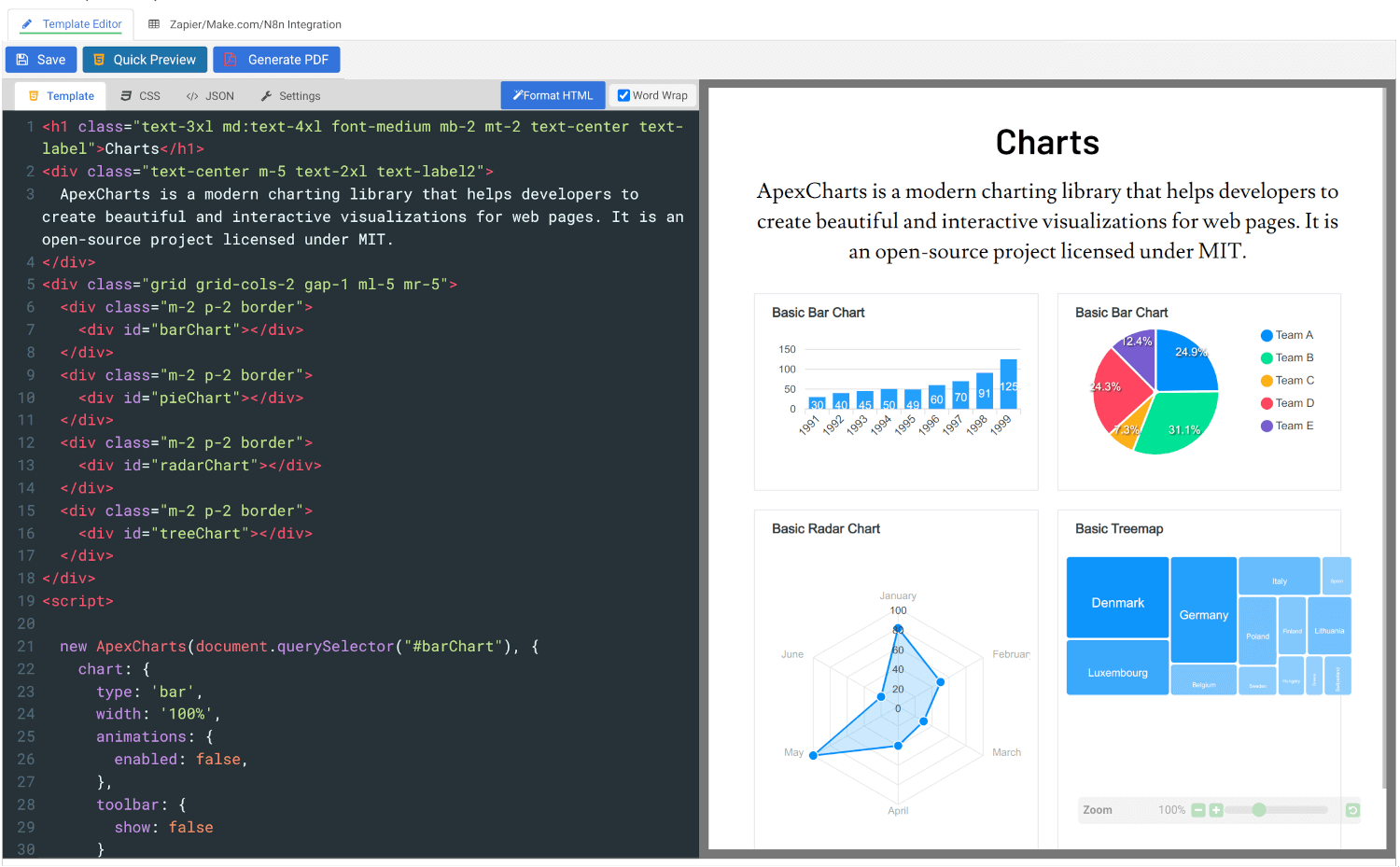
Convert HTML to PDF
Effortlessly convert HTML to PDF using APITemplate.io’s powerful HTML Template Editor. Combine your HTML, CSS, and JavaScript skills with dynamic JSON data to create custom templates that deliver pixel-perfect PDFs.
Our PDF generation solution supports modern web technologies, enabling seamless integration for your automated workflows, reports, and more.
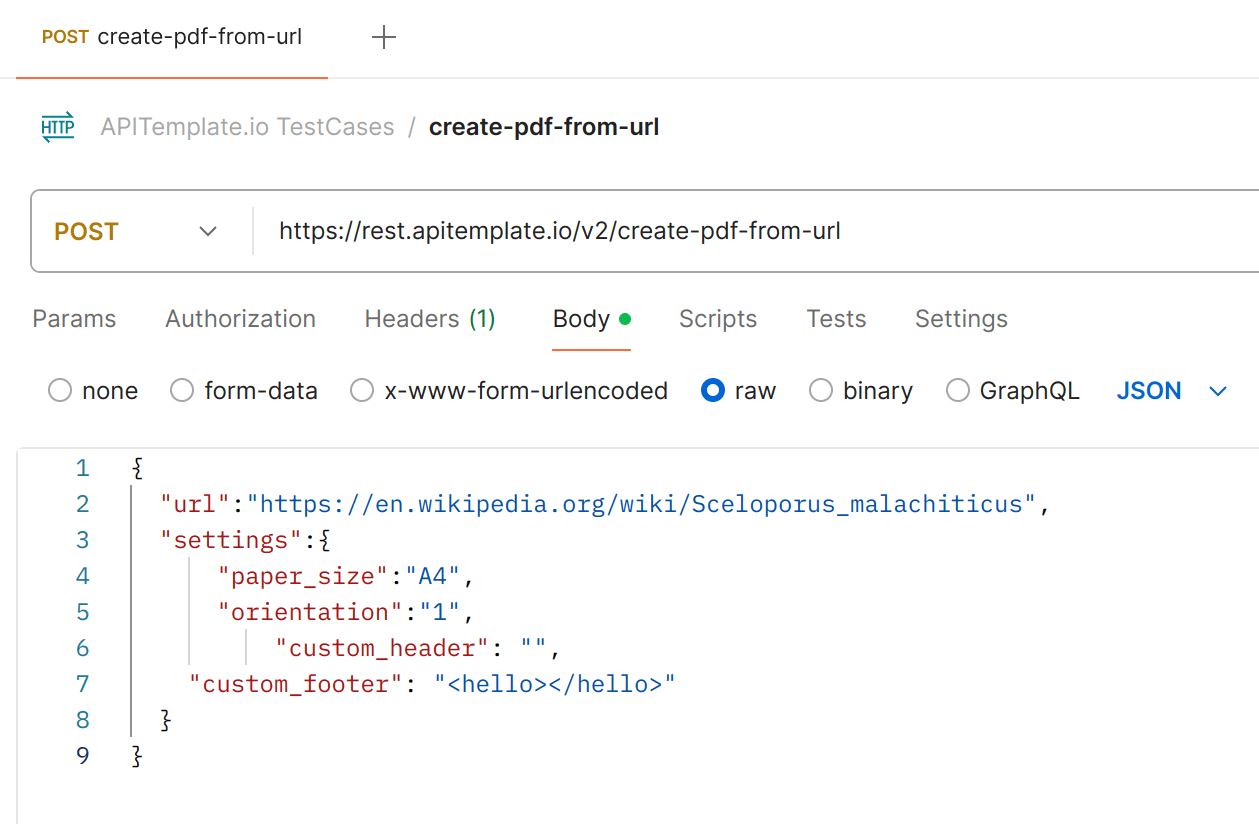
Creating PDF Documents from URL or HTML Content
APITemplate.io simplifies the process of generating professional PDFs directly from URLs or custom HTML content.
Whether you need to transform web pages, reports, invoices, or dynamic data into downloadable PDFs, APITemplate.io delivers seamless and scalable solutions.
Built for Real PDF Document Generation Workflows
Create PDFs from Reusable Templates, HTML, or URLs
Generate professional PDFs from reusable templates, raw HTML, or live web pages. Build polished documents quickly with a flexible API designed for automation at scale.
No-Code Automation & Integrations
Connect your PDF workflows with Zapier, Make, n8n, and our REST API. Automate document generation without complex setup or manual work.
4 Regional API Endpoints
Improve performance and support data residency requirements with regional processing and storage. Available regions include the US, EU, Singapore, and Australia.
Synchronous or Asynchronous Generation
Process multiple PDF generation requests at once with synchronous or asynchronous workflows. Use webhooks to get notified automatically when async jobs are complete.
Custom CSS and JavaScript Support
Fully control the design, layout, and behavior of your PDFs with custom CSS and JavaScript. Create documents that match your branding and workflow requirements.
Advanced PDF Generation Controls
Go beyond basic PDF creation with support for headers, footers, page numbers, custom styling, JavaScript rendering, and quality optimization options.
Real-Time Side-by-Side Preview
Edit and preview your templates in real time with an interactive side-by-side editor. Build faster with instant feedback for HTML, CSS, and JavaScript changes.
30+ Million PDFs and Images Generated
Trusted by businesses worldwide to generate millions of PDFs and images reliably. Scale document and image automation with confidence.
Automation and Integrations
Automate PDFs and images from Zapier, Make.com or n8n — or call the REST API from Python, C#, Java, PHP and UiPath.
curl -X POST \
  "https://rest.apitemplate.io/v2/create-pdf?template_id=6b277b234d395eca" \
  --header "Content-Type: application/json" \
  --header "X-API-KEY: YOUR_API_KEY" \
  --data '{"invoice_no": "INV38379", "total_amount": 82542.56}'

# {"status": "success", "download_url": "https://pdf.apitemplate.io/..."}
const url =
"https://rest.apitemplate.io/v2/create-pdf?template_id=6b277b234d395eca";
const res = await fetch(url, {
method: "POST",
headers: {
"Content-Type": "application/json",
"X-API-KEY": "YOUR_API_KEY",
},
body: JSON.stringify({ invoice_no: "INV38379", total_amount: 82542.56 }),
});
const { download_url } = await res.json();import requests
res = requests.post(
"https://rest.apitemplate.io/v2/create-pdf",
params={"template_id": "6b277b234d395eca"},
headers={"X-API-KEY": "YOUR_API_KEY"},
json={"invoice_no": "INV38379", "total_amount": 82542.56},
)
download_url = res.json()["download_url"]var url = "https://rest.apitemplate.io/v2/create-pdf"
+ "?template_id=6b277b234d395eca";
var json = "{\"invoice_no\": \"INV38379\", \"total_amount\": 82542.56}";
var request = HttpRequest.newBuilder().uri(URI.create(url))
.header("Content-Type", "application/json")
.header("X-API-KEY", "YOUR_API_KEY")
.POST(HttpRequest.BodyPublishers.ofString(json))
.build();
var res = HttpClient.newHttpClient()
.send(request, HttpResponse.BodyHandlers.ofString());Automate PDF and image generation with no-code platforms or the REST API
One reusable template, one JSON payload. Send data from a Zapier zap, a Make.com scenario, an n8n workflow or your own backend — every integration calls the same endpoint and returns a ready-to-share file URL.
Generate synchronously for on-screen downloads or asynchronously with webhooks for batches, and keep processing and storage in your chosen region: US, EU, Singapore or Australia.
Browse all integrationsNative integrations for the tools your team already runs, plus a REST API for everything else.













Generate PDFs in Four Simple Steps
Design once, automate forever. Create beautiful PDFs at scale with a single API call.
Sign Up Free
Create your free account in seconds. No credit card required — includes 50 PDFs/month.
Design a Template
Use our visual editor or write HTML to build a reusable PDF template with dynamic variables.
Send Data via API
Call our REST API with JSON to populate your template and generate a PDF on the fly.
Download & Share
Get a download URL or integrate with Zapier, Make, and n8n for automated workflows.
Operational Metrics for Enterprise PDF Document Automation
APITemplate.io gives technical teams clear signals on performance, reliability, infrastructure, and support for production document workflows.
~2s
Fast rendering
Typical PDFs and images render in around 2 seconds for common workflows.
99.99%
Uptime target
Built for stable document generation across scheduled and customer-facing workflows.
30M+
Files generated
Demonstrates platform maturity and real-world usage across production workloads.
24/7
Support coverage
Responsive help for onboarding, production issues, and higher-volume workflows.
Need higher limits, SLA support, or a tailored setup?
Talk to us about volume pricing, regional deployment, and support for large-scale document automation.
Customer Reviews
Trusted by businesses worldwide to generate millions of PDFs and images reliably.
See what our customers have to say
 Jamie DearFounder
We are very grateful to Jacky and the team at APITemplate - their software has helped us to auto-generate high quality images for our student reports. It has been the perfect fit for us as we grow our Oxford summer school.
 Alex DowdingVice Secretary
The Wheelchair Football Association
We've successfully automated YouTube thumbnails and match event creation for our Powerchair Football league using your templates. It integrates with our Postgres database on retool.com, is expanding to include league table graphics and match results. Thanks to an AWS Inclusion and Diversity grant, we're enhancing our live-streaming workflow, further boosted by your product's automation capabilities. We're grateful for your excellent service and wanted to share our positive experience.
 Nishitha DhanekulaCofounder /CTO
At askreferral.io, We are building referral networking platform for people to pitch and generate leads for different kinds of referrals, including, but not limited to job referrals, product referrals, funding referrals, realtor referrals etc. Having a vibrant social media community is crucial for our growth and APITemplate.io played crucial role in automating generation of digital posters for job postings, profile pitches, funding requests etc, to help us grow from 0 to 200K+ followers in LinkedIn in less than one year.
 Danaé NicolasCTO
We've been using APITemplate.io to generate social images for our karting races and it's been a huge time-saver. The support team is super responsive and helpful - they quickly resolved an issue we encountered. We highly recommend this tool to anyone who needs a similar solution.
 Ryan TurnbullIT Manager
APITemplate.io is such an easy application to use. Simple, intuititive, and code free. At simplehuman, we render all our commercial invoices, dispatch notes, and multiple other templates. The ability to create multiple layouts, and group them into a logical container - makes our lives much simpler. This is a great tool to use, both affordable, and the support service turnaround time is second to none! Defintely worth the subscription!
 Ron P.Product Manager
Had an issue with template implementation via Make and reached out for support. Within minutes, I got a response and was soon on a Zoom call resolving it. Despite the issue not being directly related to APITemplate.io, their team efficiently guided me to the right formatting. Many thanks!
 Nicholas GertzProduct Owner
We have been using the service daily in our application for a year and are very satisfied with the reliability. It meets all our requirements and requests for changes/improvements can be discussed directly with Jacky 1:1. Thanks and greetings from Germany
 Lucas FridmanChief Product Officer
We use APITemplate to generate key documentation we need to work with our industry partners. We are building a digital solution in an antiquated industry, which means we need to communicate data to our partners in the format that they are accustomed to (pdf forms). APITempate makes it easy for us to do this!
 Jean-Paul HornPublisher
We love APITemplate.io for its simplicity and ease of use. Just setup once and "forget" about it due to its fabulous 3rd party integration. New features are regularly added, and reasonable custom requests are honoured within days.
 Kevin Frickē
APITemplate.io is one of the best services I have worked with in a very, very long time. They are super responsive and a joy to work with. If you are struggling with PDF's, like I was, check 'em out!
 Jacob MonashAutomation Specialist
We run conferences with a number of speakers, each requiring an individual speaker profile. We used to create all of these profiles manually, but by incorporating APItemplate into our Zapier workflow, our team can generate a complete image with all of the speakers information in one click. Using the template editor is a bit of a learning curve, but the support team is very responsive and helpful.
 George Cooper
APITemplate.io is great. I love being able to quickly use HTML and CSS templates with dynamic variables to create documents. Support is also fast and responsive. Great vendor!
Sign up now for free!
Start generating PDFs and images from reusable templates today. No credit card, no commitment.