
How to generate dynamic or open graph images with a Direct URL
 By Jacky, Founder
With Direct URL, you can generate dynamic images or open graph images with a URL(HTTP GET) and dynamic query strings. It works without an API Key.Direct URL can be embedded into your WordPress, Webflow, or other HTML webpages. The generated images are cached on our server until the parameters are modified or the template has been updated.
Introduction
With Direct URL, you can generate dynamic images or open graph images with a URL(HTTP GET) and dynamic parameters.
Direct URL works without an API Key. It can be embedded into your WordPress, Webflow, or other HTML webpages.
The generated images are cached on our server. New images will be generated only if the parameters of the query strings are modified or the template has been updated. Caching can potentially reduce your cost by reusing the same resources.
Direct URL
To access the feature, create a template first then launch the Image Template Editor. Then select the Direct URL tab. In the tab, you can create a new key.
The settings such as Quota, Expiration can be updated after a new key is created. Click on Save All button to save all the settings.
* The base URL has been changed from https://api.apitemplate.io to https://rest.apitemplate.io
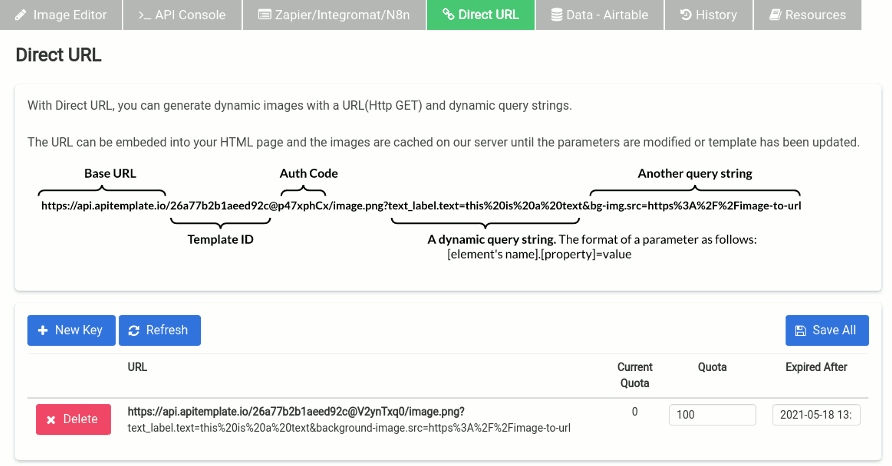
The Structure of a Direct URL
The following is the structure of a direct URL. It consists of base URL, template ID, auth code, and query strings.

Direct URL and Query String Generator
The query strings’ format as follows:
[element’s name].[property]
You can obtain them in Zapier/Integromat/N8n tab. Below is a tool that helps to generate a Direct URL.
Fill in the details to generate a direct URL
| Template ID | |
| Auth Code |
| Element.Property | Value |
Direct URL:
Conclusion
With Direct URL, you can generate dynamic images by changing the query strings. It’s a quick and easy way to automate image generation for your content. Nonprofits building their giving pages on Webflow can apply the same direct-URL approach to power dynamic visuals alongside a seamless Webflow donation setup.
Other Blog Articles

5 Easy Steps to Automate Image Generation API – FREE with Zapier, Google sheets, and APITemplate.io
In this tutorial, we are going to automate the process of image generation with Zapier, Google sheets and APITemplate.io to create custom product images based on a predefined template and a product listing.

How to Automate Job Posting Images for LinkedIn
In this tutorial, we will walk you through the process of automating job posting images on LinkedIn with Zapier, Airtable, and APITemplate.io

How to automatically generate social media images from your Shopify product list
In this blog post, we will be guiding you how to automate the image generation process to generate the perfect product photos for your products with just a couple of clicks.